AI Audio Enhancer for Clearer Speech
An AI audio enhancer can make a spoken recording easier to follow when a fan, street, or room sound competes with the voice. Hear the first 30 seconds before and after cleaning, then decide whether the result fits your work.
Free 30-second preview. No sign-up needed. Files are deleted after 7 days.

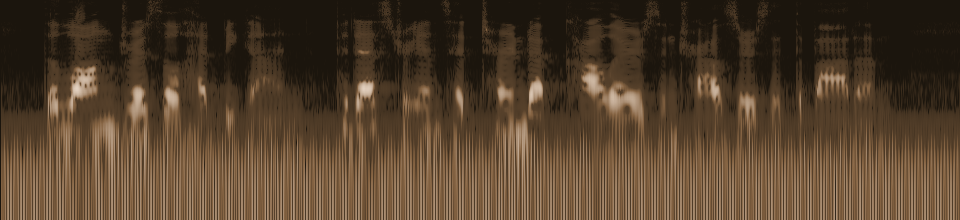

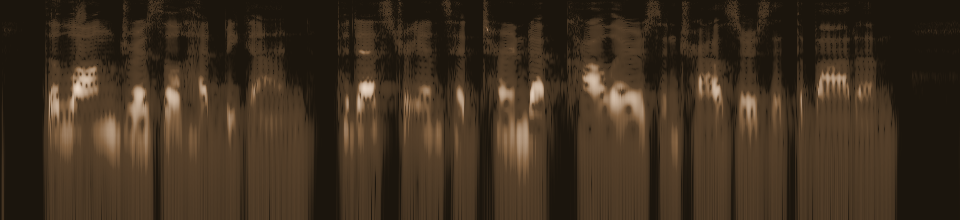
Both versions play at the same loudness, so you only hear the difference in noise.
LibriSpeech speech (CC BY 4.0), mixed with synthetic noise. Real AI output. Sources & license
What enhancement means here
This audio cleaner focuses on reducing unwanted background sound around speech so a voice is easier to follow. It is useful for a podcast draft, a lesson, a meeting note, or a phone interview with an audible hum or hiss. It does not master music, level several speakers independently, restore clipped peaks, or turn a distant voice into a close-miked studio take.
Use the audio cleaner to judge speech clarity, not to promise a studio finish. A quiet recording can still contain useful speech detail. Compare it at a comfortable volume instead of judging only by loudness. A louder version is not automatically clearer, and aggressive filtering can make words less natural even when the noise floor falls.
Use the free comparison as your quality check
Choose an MP3, WAV, M4A, AAC, OGG, or FLAC file, or a supported video. The preview runs on the first 30 seconds without sign-in for files up to 200 MB. Listen to original and cleaned playback using the same device and volume. Check the beginnings and ends of words, breath sounds, and quiet consonants.
If the noise varies during a long recording, preview a trimmed copy of the hardest section. A good result at the start does not guarantee the same balance later. Keep the original so you can return to it if the cleaned full file changes something you needed.
Where the tool helps and where it stops
Steady air-conditioning hum and light hiss may be good candidates because the voice remains distinguishable. Traffic, keyboard taps, and intermittent room sound can also be worth testing. Music under dialogue, simultaneous speakers, and distortion overlap with the voice in harder ways. An AI audio enhancer cannot separate every element cleanly when they occupy the same moment.
If a microphone overloaded or a syllable was never captured, processing cannot invent an accurate replacement. Re-recording or using a closer microphone may give a better result than additional cleanup passes.
Choose a full output only after listening
When the preview is useful, sign in and process the complete file. Full jobs use one credit per started minute; a file slightly longer than one minute uses two credits. Choose a subscription or one-time pack. Subscription minutes expire monthly; pack minutes never expire. Failed jobs return reserved minutes.
Download audio as WAV for editing or 192 kbps MP3 for a smaller listening copy. Compatible video becomes MP4 with its original video stream copied and a new 192 kbps AAC soundtrack. Uploaded sources and results are deleted after seven days, so download the file promptly.
Keep your workflow simple
For a specific outdoor gust problem, read the wind guide and test whether speech remains intact. The video guide covers picture preservation and compatibility. The background noise remover on the homepage explains the complete upload-to-download flow, while the tutorial gives a longer checklist for comparing original and cleaned speech.
Frequently asked questions
Does enhancement make every recording sound professional?
No. Results depend on the source. Background noise may fall, but microphone clipping, distant speech, mixed music, and overlapping voices can remain.
Which audio download should I use for editing?
Choose WAV if you plan to edit or mix further. Choose the 192 kbps MP3 if you want a smaller file for sharing or review.
Can I hear the result before buying minutes?
Yes. A free 30-second comparison is available without an account for a file up to 200 MB. Pay only if you choose a full job.
Will the tool improve quiet speech?
It may reduce competing sound around an audible voice, but it cannot recreate detail that was never captured. Listen to quiet words in the preview.
Are uploaded files stored permanently?
No. Source and result files are deleted after seven days. Keep your original recording and download the finished file before it expires.